
Key facts
- An archived iNevidimka guide with practical notes for devices, software, and web tools.
- From the top menu, select Safari > Preferences.
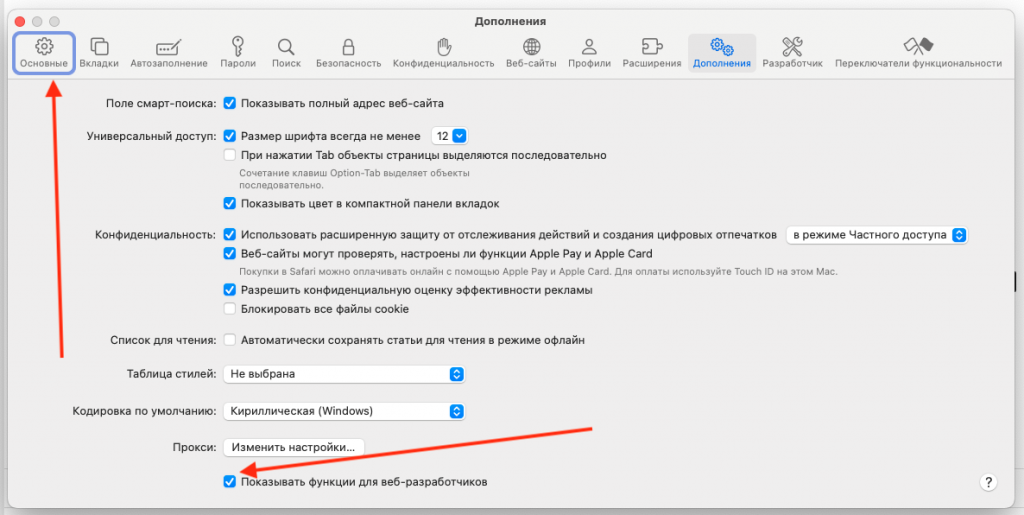
- At the bottom of the window, check the box next to "Show features for web developers.".
Браузер Safari от Apple известен своей скоростью и эффективностью. Однако не все знают, что в нём есть удобные функции для веб-разработчиков и любознательных пользователей, включая просмотр исходного кода веб-страниц. В этой статье мы расскажем, как легко и быстро в Сафари открыть код страницы и получить доступ к HTML, CSS и JavaScript любой страницы через Safari на Mac.

Step 1: Enable Developer Menu in Safari
Before you begin, you need to activate the "Development" menu. To do this:
- Launch Safari.
- From the top menu, select Safari > Preferences.
- Go to the Advanced tab.
- At the bottom of the window, check the box next to "Show features for web developers."
Step 2: View the page source code
Now that you have access to the developer menu:
- Open the web page you are interested in.
- In the menu bar, select Click on "Show page source code" or use the keyboard shortcut
⌥⌘U.

In the window that opens, you will see the full source code of the page. You will be able to see the HTML structure, CSS styles, and JavaScript scripts.
Alternative methods
Additionally, you can right-click any element on the page and select “Inspect Element.” This will open the developer tools directly in the context of the selected element, allowing you to analyze and modify the HTML and CSS in real time.

Using Safari's View Source feature is a great way for developers and curious users to explore web pages, understand how sites are built, and even help teach web development. Remember, changes made through the developer tools are local only and do not affect the actual site.